
The previous article, Convert PDF Flowcharts to Editable Word, explained how recognizable boxes, connectors, arrows, and text in a PDF can be reconstructed as editable Word graphics.
This article continues with the next step in that workflow: when you translate a PDF by choosing Reflow—which produces editable Word—how should text inside flowcharts be handled? If your goal is a translated PDF that keeps the original page layout as closely as possible, choose Keep Layout. That is a different delivery goal and outside the scope of this article.
Flowcharts in technical white papers, protocol documentation, and product manuals often contain information that the surrounding text cannot replace. Node names, validation steps, arrow labels, and group headings can all affect how readers understand the content. It is not enough for these elements to simply remain visible in the DOCX—they also need to enter the translation workflow with the body text and be written back into their original nodes correctly.
This creates challenges that are less common in body-text translation: whether text in diagrams can be extracted completely, whether terminology stays consistent with the body text, whether longer translations overlap arrows or extend beyond boxes, and whether the target-language font works with the existing layout.
Why is the body text translated but the flowchart still in the source language?
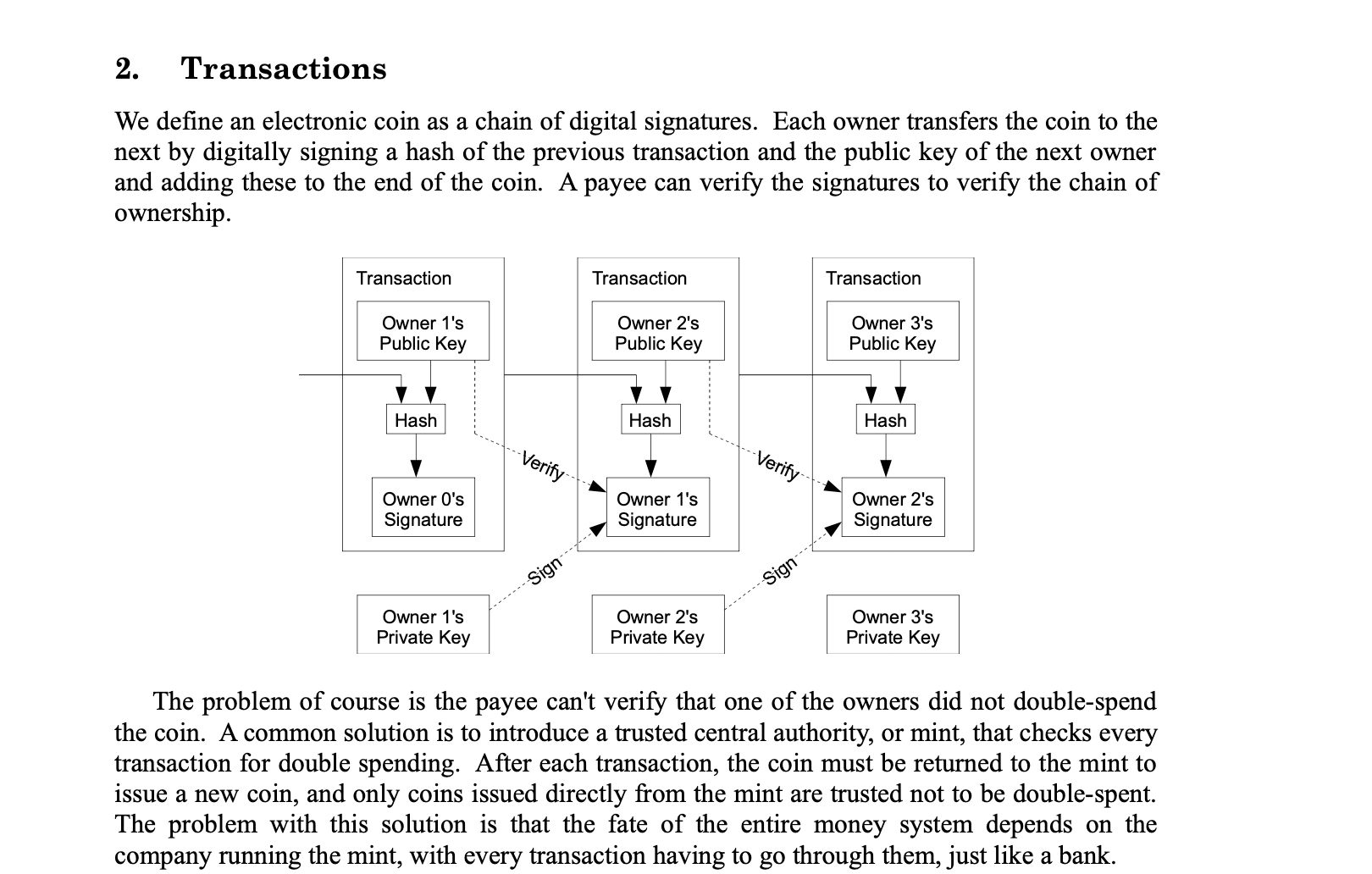
A flowchart in a PDF is usually not a normal paragraph. It may consist of rectangles, lines, arrows, and text positioned by coordinates, while the page itself may not define which text belongs to which node.
Standard text extraction can produce several outcomes:
- Only the body text is translated, while flowchart text never enters the translation task.
- Text in the diagram is extracted as disconnected fragments and loses its relationship to the relevant box.
- The entire diagram is treated as an image, leaving users to erase and replace text manually.
- OCR recognizes the text but cannot reliably restore the relationships between arrows and nodes.
For this reason, translating a flowchart requires more than text recognition. The system also needs to determine which box or connector each piece of text belongs to and write the translation back to the correct location.
How does text in a diagram enter the same translation workflow?
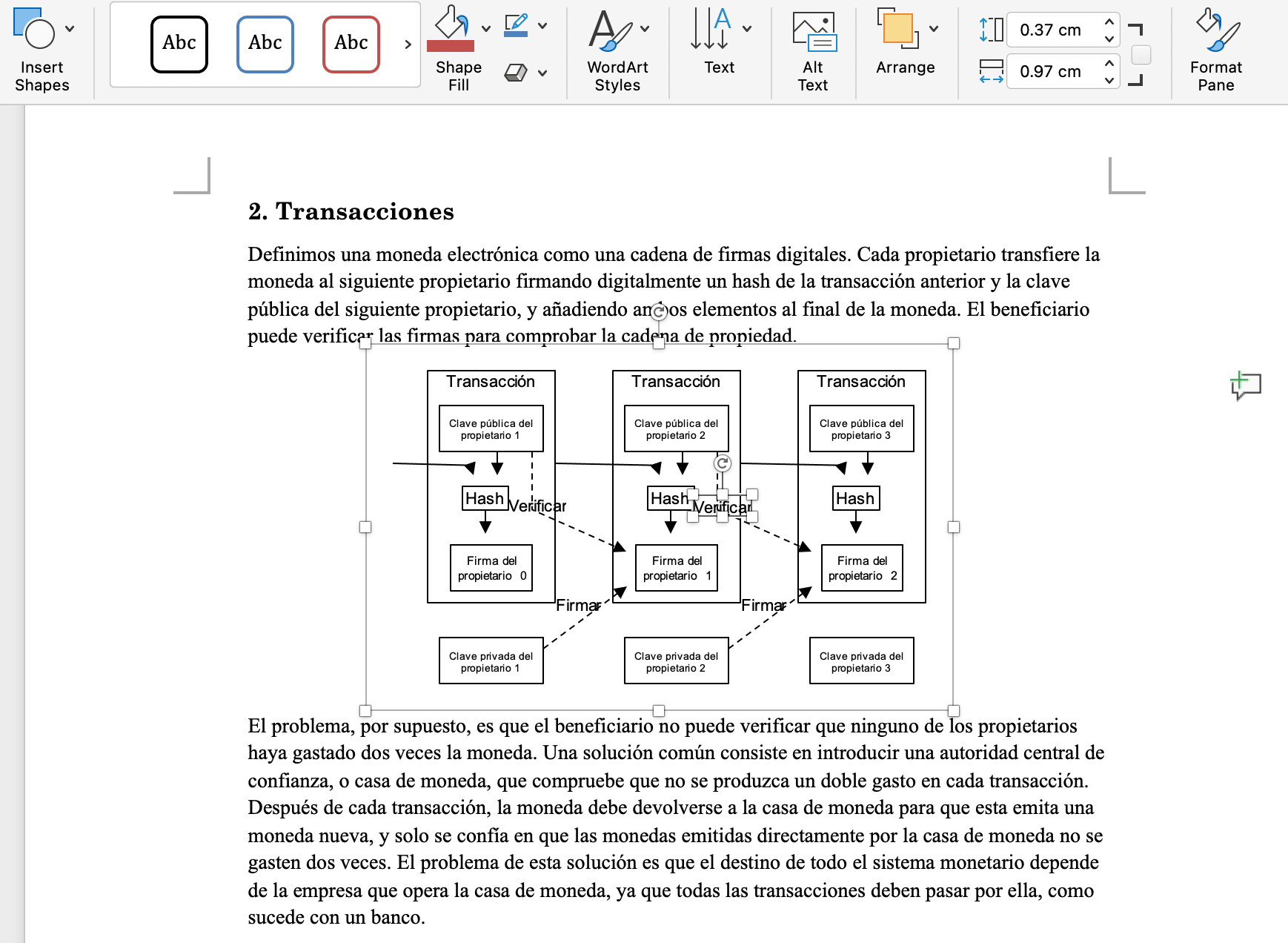
For recognizable vector flowcharts, SimplifyAI attempts to restore the relationships between nodes, connectors, and text. Node titles, arrow labels, and standalone explanatory text can enter the same translation task as the body content instead of remaining in an uneditable image.
This provides two practical benefits:
- More consistent terminology
Terms such asTransaction,Signature, or product-specific terminology can use the same target language, glossary, and translation preferences as the body text. - Editable after translation
The result can remain as Word graphics. If a reviewer finds that a node translation is unsuitable, they can edit the text directly instead of rebuilding the entire diagram.
This article covers flowcharts reconstructed from PDF vector graphics. If the source file contains an embedded Visio object in Word, its object structure and processing path are different. See How to Translate Embedded Visio Diagrams in Word Without Exporting Images.
Why does translated text often extend beyond the box?
The visual length of the same message can change substantially between languages:
- When English is translated into German or Spanish, words and phrases often become longer.
- Chinese and Japanese may use fewer characters, but their glyphs are generally wider than Latin letters.
- The target language may require a different font, and font substitution on a local computer can change the actual text width.
- The original nodes may already be narrow, with little room for multilingual content.
If the original font size is used when writing the translation back, the text may wrap onto multiple lines, cover connectors, or run outside the node boundary. Simply shrinking the font indefinitely is not a good solution either: the text may fit, but become too small to read.
SimplifyAI makes appropriate adjustments to diagram text based on text expansion between the source and translation, using font settings appropriate for the target language. The goal is to balance a fixed graphic layout, readable text, and editability—not to claim that every flowchart can undergo automatic reflow without review.
Can the flowchart still be edited in Word after translation?
For final delivery, it is best to spot-check the file in the desktop version of Word. Different computers have different fonts installed, and font substitution can affect text width and line wrapping. The actual delivery file is therefore the basis for layout confirmation.
The translated text is written back into the graphic itself rather than flattened into an image. If a reviewer disagrees with a node translation, they can edit the text directly. If a translation is too long, they can also adjust the font size or box width, save the DOCX, and continue the workflow.
Current scope and limitations
Best suited for:
- PDF vector flowcharts with a clear text layer, primarily made of rectangular nodes and connectors.
- Technical documents where node text and arrow labels have clear positions.
- Workflows that need to deliver translated content as editable DOCX.
- Multilingual projects that need terminology in diagrams to stay consistent with the body text.
Requires human review or may not be processed automatically:
- Scanned flowcharts or flowcharts flattened into bitmap images.
- Hand-drawn diagrams, freeform curves, data charts, and complex illustrations.
- Target languages with substantial text expansion when nodes are very narrow.
- Source diagrams that already contain overlapping text, unclear arrow endpoints, or missing fonts.
- Graphics with relationships too ambiguous to reliably determine which node owns each text element.
When a diagram cannot be restored reliably, it should not be rebuilt with invented relationships solely for automatic translation. Key flowcharts still need human review before formal delivery.
Practical workflow
- Upload a PDF containing vector flowcharts and choose “Translate document.”
- Under PDF translation options, select Reflow.
- Set the target language and terminology preferences. While processing the body text, the system also attempts to identify translatable text in diagrams.
- Download the DOCX and check node translations, arrow relationships, and whether text extends beyond boxes in desktop Word.
- Perform a final manual layout pass for diagrams with long translations or dense nodes.
If you do not need translation yet and only want to convert a flowchart into editable Word content, see Convert PDF Flowcharts to Editable Word. If the final result needs to enter a knowledge base, continue with DOCX Flowchart to Markdown: SVG and Mermaid.
Next step
Start with a small validation using a real PDF that contains representative flowcharts. For complex documents, the quality of text handling inside diagrams often determines whether the translation can move directly into review and delivery, so it is worth confirming before scaling up.